#Microsoft365 PowerPoint Live Presentations


Organization: HCS COMPANY MICROSOFT SERVICES B.V.

PowerPoint Live Presentations


Major update: Announcement started

Applied To: All


We will soon release Live Presentations for PowerPoint for web, which allows audience members to see slides and a live transcript of the presenter’s spoken words (including live translation) on their devices.

This message is associated with Microsoft 365 Roadmap ID 51121.

[When this will happen]

  • We will be rolling this out to Targeted Release customers early May.
  • We will be rolling this out to Standard Release customers early June.
  • We expect the rollout to be complete by the end of June.

[How this affects your organization]

This new capability will be deployed via Office 365. 

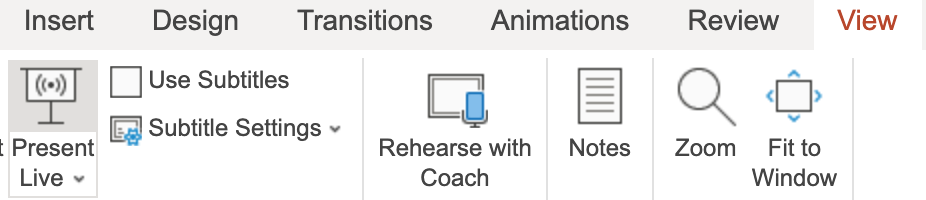
On the day of a presentation, the presenter selects “Present Live” either from within the Slide Show tab (in case of the Simplified ribbon) or from the View tab: 

Simplified ribbon
simplified ribbon

Classic ribbon
classic ribbon


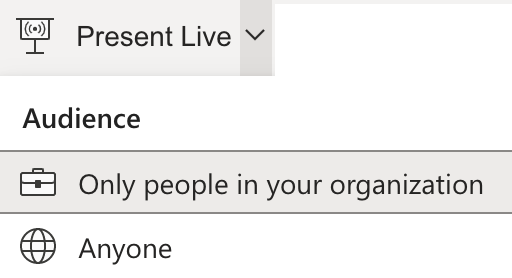
Before starting live presentation, the presenter can choose who will be able to access the session:
presenter options

  • Only people in your organization - Limits access to people signed in with accounts within the same Office 365 organization (work or school account) as the presenter.
  • Anyone - Allows access to anyone who has the link to the live presentation.


A live presentation allows each audience member to follow a presentation on their own device, whether laptop, tablet or phone. They can also choose live subtitles from more than 60 languages, navigate between slides, send real-time reactions and provide feedback to the presenter. 

What you need to do to prepare for the change

By default, Office 365 users in your organization will be able to choose whether only people from the same organization can join a live presentation or whether it is accessible to anyone who has the link. 

  • If you choose to retain this default setting, when a presenter prepares to share a PowerPoint Live presentation, “Only people in your organization” will be the default selection. The presenter would need to change the default to allow access by anyone.
  • If you don't want to allow people outside your organization to be able to join PowerPoint live presentations , you can turn off the ability for your users to start public live presentation using the Office Cloud Policy Service (OCPS) to disable the ‘Public Live Presentation’ policy (see details below). If you disable this feature users will still be able to start live presentations in PowerPoint that can be joined only by people from the same organization. 

Note: You can configure the policy prior to the release of this feature, and once this feature is released the policy that you configure will be honored. 

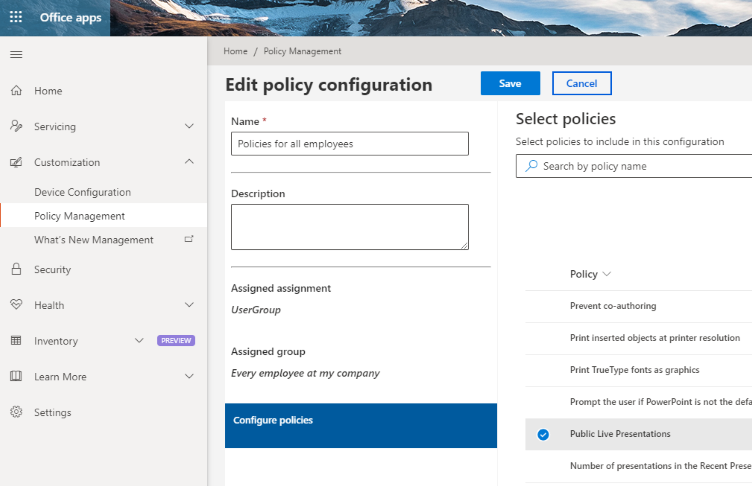
To configure the ‘Public Live Presentation’ policy using Office cloud policy service (OCPS):

  1. Sign into the Office customization portal
  2. Under ‘Customization’, select ‘Policy Management’
  3. On the ‘Policy configurations’ page, select ‘Create’
    • You may also click ‘Edit’ to add this policy to an existing configuration
  4. On the policy configuration page, do the following: 
    • Enter a name for the configuration, set the assignment to ‘This policy configuration applies to users’, and select the AAD-based security group that this configuration will apply to.
    • Select ‘Configure policies’ and search for the "Public Live Presentations" in the list of policies.
      configuration paenl
    • Save your policy configuration. 


Learn more


Sign in to the Office 365 Admin center to use the links below:

View this message in the Office 365 message center

To customize what's included in this email, who gets it, or to unsubscribe, set your Message center preferences.
If you are receiving this email because your Admin added you as a recipient, please contact your Admin to unsubscribe.

Edit release preferences
Choose the release track for your organization. Use these settings to join First Release if you haven't already.


Microsoft respects your privacy. To learn more, please read our Privacy Statement.

Microsoft Corporation
One Microsoft Way
Redmond, WA, USA 98052

Comments

Popular posts from this blog

Schedule Management for Firstline workers coming to Teams through Shifts app

    Organization: HCS COMPANY Schedule Management for Firstline workers coming to Teams through Shifts app     Major update: General Availability rollout started Applied to: All customers     New app: Microsoft Teams Shifts app for Schedule Management Shifts, your schedule management tool in Teams, will be publicly available to all Teams users on Web, Desktop, Mac, iOS and Android. Shifts is rolling out now and will be completed shortly. This message is associated with Microsoft 365 Roadmap ID 43333 . [How does this affect me?] Shifts can be accessed by users from the overflow menu located in the navigation bar on all clients. Shifts is enabled by default for all Teams users in your organization. Shifts is not available in GCC at this time...

Message center announcements, December 11, 2023 - December 17, 2023

  View a summary of the updates.                                                                                                                                                                ...

Office Telemetry Dashboard to be removed from #Microsoft365 Apps for enterprise, starting with Version 2208

Office Telemetry Dashboard to be removed from Microsoft 365 Apps for enterprise, starting with Version 2208 MC262540 · HCS COMPANY MICROSOFT SERVICES B.V. Office Telemetry Dashboard is being removed from Microsoft 365 Apps for enterprise. The first version of Microsoft 365 Apps for enterprise without Office Telemetry Dashboard will be Version 2208, which is expected to be available first in Current Channel in the second half of August 2022. Note: If you do not use Office Telemetry Dashboard, you can disregard this message. Components of the Office Telemetry Dashboard will no longer be available in Version 2208 or later including the Office Telemetry Agent, Office Telemetry Processor, and the dashboard itself. Note: Office Telemetry Log is not being removed and will still be available on client devices running Windows. When will this happen: The first version of Microsoft 365 Apps for enterprise without Office Telemetry Dashboard will be Version 2208. That version is expected to be ...