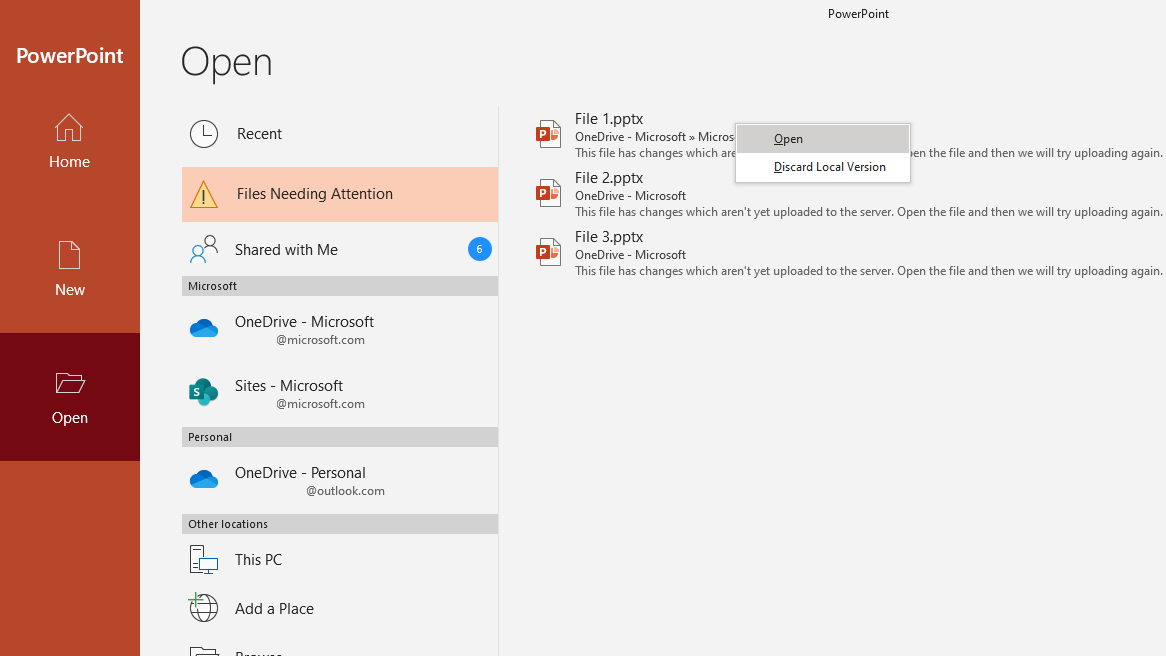
Microsoft replaces #Office Upload Center


Upload Center is being replaced by the in-app Files Needing Attention experience


Major update: Announcement started

Applied To: All customers


We will be retiring the Upload Center from Office beginning mid-October 2019. 

[How does this affect me?]

Users will no longer be able to find the files that did not save successfully under the Upload Center when this change is implemented. Instead, we recommend the utilization of the Files Needing Attention experience under File>Open.


We'll be gradually rolling this out to the Insiders community in mid-October 2019, and the roll out will be completed by the end of December 2019.

[What do I need to do to prepare for this change?]

Instruct users to go to File>Open>Files Needing Attention to Open/Discard files that did not save successfully. If applicable, please update any documentation to reflect the same.  

Please click Additional Information to learn more.


Sign in to the Office 365 Admin center to use the links below:

View this message in the Office 365 message center

To customize what's included in this email, who gets it, or to unsubscribe, set your Message center preferences.
If you are receiving this email because your Admin added you as a recipient, please contact your Admin to unsubscribe.

Edit release preferences
Choose the release track for your organization. Use these settings to join First Release if you haven't already.


Microsoft respects your privacy. To learn more, please read our Privacy Statement.

Microsoft Corporation
One Microsoft Way
Redmond, WA, USA 98052


Comments

Post a Comment

Popular posts from this blog

Message center announcements, December 11, 2023 - December 17, 2023

  View a summary of the updates.                                                                                                                                                                ...

Schedule Management for Firstline workers coming to Teams through Shifts app

    Organization: HCS COMPANY Schedule Management for Firstline workers coming to Teams through Shifts app     Major update: General Availability rollout started Applied to: All customers     New app: Microsoft Teams Shifts app for Schedule Management Shifts, your schedule management tool in Teams, will be publicly available to all Teams users on Web, Desktop, Mac, iOS and Android. Shifts is rolling out now and will be completed shortly. This message is associated with Microsoft 365 Roadmap ID 43333 . [How does this affect me?] Shifts can be accessed by users from the overflow menu located in the navigation bar on all clients. Shifts is enabled by default for all Teams users in your organization. Shifts is not available in GCC at this time...

Office Telemetry Dashboard to be removed from #Microsoft365 Apps for enterprise, starting with Version 2208

Office Telemetry Dashboard to be removed from Microsoft 365 Apps for enterprise, starting with Version 2208 MC262540 · HCS COMPANY MICROSOFT SERVICES B.V. Office Telemetry Dashboard is being removed from Microsoft 365 Apps for enterprise. The first version of Microsoft 365 Apps for enterprise without Office Telemetry Dashboard will be Version 2208, which is expected to be available first in Current Channel in the second half of August 2022. Note: If you do not use Office Telemetry Dashboard, you can disregard this message. Components of the Office Telemetry Dashboard will no longer be available in Version 2208 or later including the Office Telemetry Agent, Office Telemetry Processor, and the dashboard itself. Note: Office Telemetry Log is not being removed and will still be available on client devices running Windows. When will this happen: The first version of Microsoft 365 Apps for enterprise without Office Telemetry Dashboard will be Version 2208. That version is expected to be ...